Showing posts with label research. Show all posts

Monday, September 19, 2016

Monday: Ideas and Connections and Web Site Accuracy


Mondays are a great day to get new ideas from the news.

A great place to look is Tween Tribune. Students do not sign up; teachers do. You do not need to sign up to read the articles. This site, sponsored by the Smithsonian, aggregates news for kids-- and creates them with questions and at different reading levels.
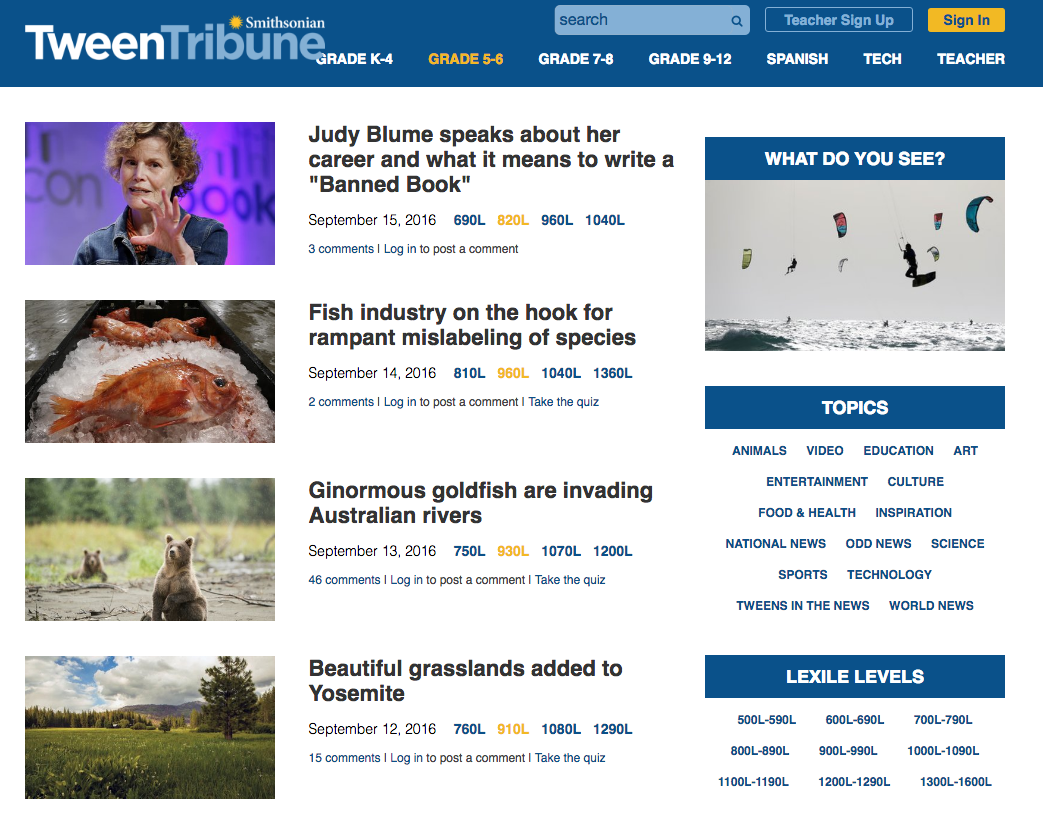

See the menu at top for grade levels, and in the right sidebar see topics and Lexile Reading Levels.

Notice there is a search bar, although it is better just to choose a topic of interest to you.

How is Tween Tribune helpful if your teacher does not have an account?

Choose a topic and discover for yourself the interesting news events of today. Read an article, and ask yourself questions:
  • What are the facts in the article?
  • What is the main message the article wants me to understand?
  • Why am I interested in this topic?
  • What in this topic connects to me and my world?
  • What did I know before?
  • What do I know now?
Freewrite about the ideas -- do not summarize, copy, or paraphrase the article: just write about the topic. Put a link to the article in your freewrite so you can return to cite your source and verify facts if you need to.

Another wonderful place to gather ideas is Wonderopolis 


You may ask a question -- or choose from those already asked:

Ask yourself the same questions about the article as listed before and freewrite, including the link to the article read.


Writers know stuff; they write about what they know and see.  And this is one way to add to your knowledge for three reasons:
  • You'll know how to find information
  • You'll know when what others say are fact or fiction
  • Your writing will be believable.
But do ask yourself:
How does this connect to my writing this week?
  • Would it fit with a report or article I want to write - -or an assignment?
  • Would the facts, revised into my story, enhance the events and characters in my story?
  • Do I need to revise my story to be more real?
  • Could I write a story of fiction in which the characters and the plot illustrate these facts?
  • Could I create a project that adds value to the information from my interpretation [Animoto, slides, podcast, poem, story, Did You Know, etc.]?
~~~~~~~~~~~~~~~~~~~~~~~~
What if you want to search "Google" for a topic?  Learn how to search first:


Then -- be Web Smart.  Many of the millions of pages on the Internet are false, fake, and filled with misinformation. YOU must know HOW to validate and verify the accuracy of the website.  How?  From Google Educators Daniel Russell, Tasha Bergson-Michelson, and Trent Maverick are these tips:


And


Follow the lesson on their slides to practice identifying factual or fake [or misinformation that looks like facts].

After trying the lessons, check out the lessons and try the activities [see bold green ] here

If you think you're ready for a challenge, try the project challenges in bold magenta here.

Your turn:
Share your topic writing [freewrite, stories, poems, etc] that shows your researched ideas at work.

Put a link to your post with your challenge solutions in the comments below.

Teach others: Create your own "search and validate" slide or document or blog post and include the link in a comment below.


~~~~~~~~~~~~~~~~~~~~~~~


Thanks for learning together.


Tuesday, September 6, 2016

Slice of Life Writing


What is a slice of life story?  
A slice of life story is a realistic SHORT story, a slice of your life retold as fiction. It’s just a “snippet” that tells a moment in your everyday life.  That moment is like a snapshot. When you look at it, you remember and write what happened just before, then you describe your snapshot experience with as much realism and details as possible— as if it’s happening right now. 

Write so your reader can feel what you feel, see what you see, do what you do, and think what you do. It is not a list of things you did in one day— it is one moment of time that you capture step by step. It does not contain personal information, just a story. Remember to change the names to protect the innocent and the guilty.

Click here for an annotated example of a slice of life story. Notice all the specific details and descriptions and dialogue -- lots of sights and sounds-- taking you moment by moment through the story. Each word, chosen so carefully, engages the imagination of the reader. This is "word choice."

Remember, your moment is one others can learn from — or laugh or cry because the reader has experienced something similar. Our lives in their everyday moments are special, because it is the journey that is important; let’s share that slice of our days. 

Read another example here.  

Why write a slice of life?
  • You will have readers hearing your voice because you have written using sensory details [sights, sounds, smells, tastes, emotions] and action.
  • You will discover new topics, turn the ordinary into extraordinary, and become better with each slice.
  • You can try out new techniques taught in lessons, and share some of your own.
  • You will begin to notice that stories are everywhere.
  • You will also be a member of a writing community.
  • You will learn how to give positive and constructive feedback.
Enjoy discovering your own and others’ new stories.  I look forward to reading them soon.

Get Started

Open your Google Docs. Name it Slice of Life and your first name.  You can draft all your "slices" on this document each week. Make a list of memories, animal stories, little brother or sister stories, fun times, silly times, etc.  Choose one that's school appropriate. Example

  1. Quickly write about that slice for a few minutes, just to get the idea down.
  2. Now, jump down a few spaces, and start over -- this time, write it like it's happening now.  Describe the setting and the feelings just before it happened.  Then describe the event with details, sights, sounds, and dialogue. Let us live it too. Put your voice into it.
  3. End with how you felt, and a question for us.
  4. Edit your spelling, punctuation, capitalization, grammar.
  5. While editing, think of a good title.
  6. Below your post, share the excellent writing you did. For example, in this practice and this blog:
  • I described the setting:  "The wind blew through the cracks in the window sill of the older home, and the furnace creaked, both keeping me awake the whole night."
  • I included descriptions:
  • Sights: "We built a snowman, rolling and pressing the crisp snow into huge balls. We placed rocks for eyes, nose, and mouth, and stood back to look at our creation, pushing our scarves up over our noses"
  • Sounds: "the furnace creaked"
  • I included details [5WH]: "I ran back to the front door, but it was still locked. A tear welled up in my eye, but I brushed it away. I rocked back and forth from foot to foot to keep the cold from holding onto them. I walked in circles around the house for what seemed like hours."
  • I included dialogue:
"Tag -- you're it!"I caught her right away -- I was a fast kid.Sandy pouted, "Not fair!"
     7. Copy and paste your Slice of Life and writing skills into a new blog post. Title it "SOL + your topic/title".  Write Slice of Life as a label so you can find all your posts for Tuesdays. Download the orange "Slice of Life" image at the top of this post and upload it to your blog, if you want. Add another Creative Commons or Public Domain image to your blog too. 

Note about Images:
Go here for more information on images: How to find Creative Commons images
Remember to cite the source of your image.
Remember to only use Creative Commons or Public Domain images.
Respect the copyright of others-- -- you wouldn't want someone else to steal your images.

8.  Publish. Here are more examples of  Slice of Life with Writing Strategies blogposts.

9. Read and comment on two of your peers' Slice of Life.  If you want a professional and linked URL, click here to learn how to do this.  Go here to see two comments  one just pasting the URL, and the other using this code.


Next Steps

We will continue to write SLICE posts and reflect on our growth as writers as well as connect with other SLICErs. 

On another day, I will post a reflection piece for you to choose your best SLICE and explain why you think so with explanations of the research and writing strategies you used for your SLICE to make it good.

Look for other classrooms writing for Slice of Life too.  

Blog Example and Directions

Sunday, March 8, 2009

Research Required? Use Diigo!

Do you have research to do? A question to answer? Information to share? Here's the tool for highlighting, annotating, and sharing that important information.

Writers need information, background knowledge, and quotes to add depth and detail to their work. Diigo makes that task of organizing, notating, annotating, and sharing that information so much easier.

Diigo is web-browser enabled tool that allows users to highlight, annotate, and share information from the web.


Notice the yellow highlights and the pink highlights with an annotation.


Once you have bookmarked through Diigo your page, you can retrieve the link to the page, all your highlights, and all your annotations:


Here is the Diigo site of group bookmarks with annotations (green box) and comments (orange box) expanded.

These can be extracted and placed in a document (wiki, word process document, etc.) to analyze to draw one's own conclusions for research reports or other research needs.


This is a fantastic and collaborative research tool. The eighth grade students are conducting independent research from which their notes and annotations become resources for their draft conclusions for their thesis focus.

The fifth grade students are learning about Memphis, Tennessee from essays written by their Presbyterian Day School friends and placed on Mapskip. Students will write an itinerary for the choices they would recommend based on their notes and annotations on the work of our friends.

For a more complete How to Diigo, click here and here.